Workflow Builder with AI Triggers
Design and Automate Workflows with Smart AI Triggers
Build intelligent workflows that automate actions based on user inputs, data updates, or system events — using Kriatix’s Workflow Builder with AI Triggers.


See Workflow Builder with AI Triggers In Action
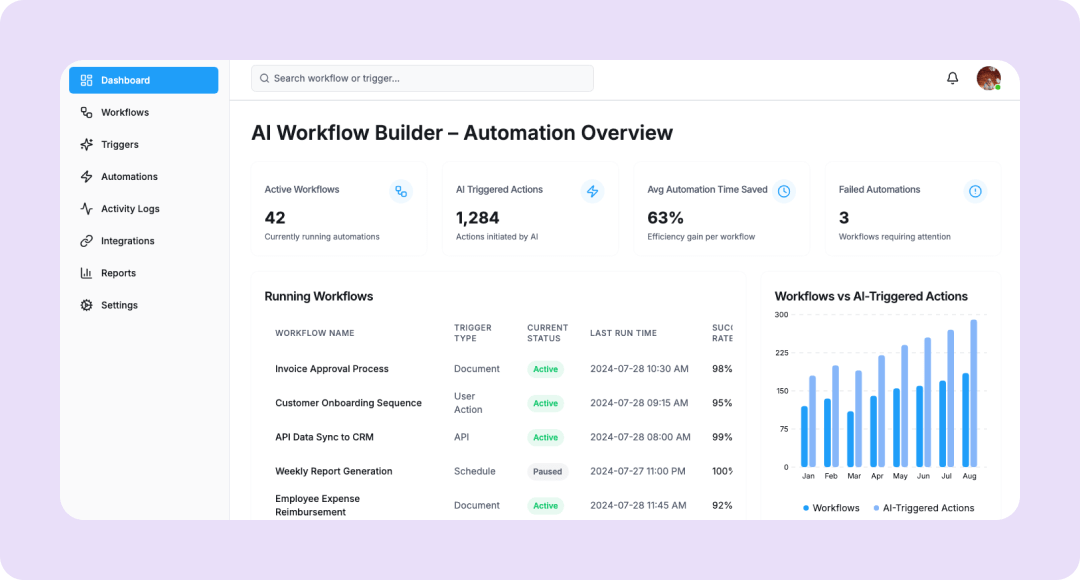
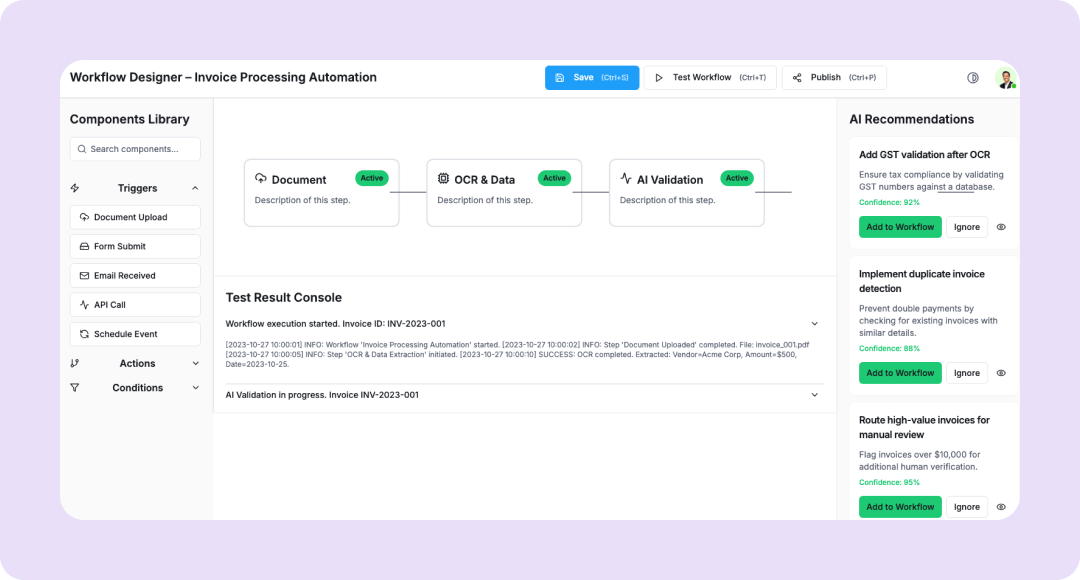
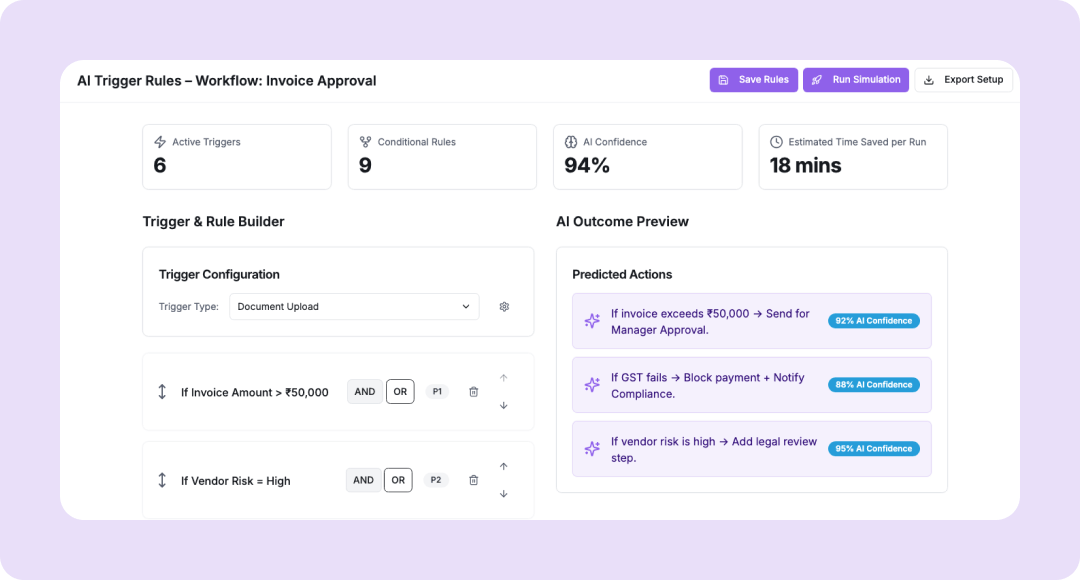
The Workflow Builder with AI Triggers by Kriatix enables teams to create end-to-end automated workflows with zero coding. Users can visually design task flows, define conditions, and add AI triggers that automatically suggest the next best step—whether it’s sending alerts, updating records, or generating documents. It’s ideal for operations, HR, finance, and customer service teams seeking to scale repetitive processes efficiently.
🔹 Low-code drag-and-drop workflow designer
🔹 Smart triggers powered by AI recommendations
🔹 Automate actions across apps, emails, and data systems
What Is the Workflow Builder with AI Triggers?
The Workflow Builder with AI Triggers is a visual automation engine that combines rule-based logic with AI insights.It analyzes historical data and user behavior to suggest the next logical step in any workflow—such as approval routing, task creation, or document generation.This makes automation intuitive, adaptive, and truly intelligent for both technical and non-technical users.
Who Is It For?
| Role | How They Benefit |
|---|---|
| Operations Teams | Automate repetitive approval or review processes |
| HR Managers | Build employee onboarding/offboarding workflows |
| Finance Teams | Trigger invoice validation or payment tasks automatically |
| IT & System Admins | Create rule-based alerts and automation across tools |
| CX Leaders | Build dynamic customer service workflows without coding |
Key Features
- Drag-and-drop workflow designer
- AI-trigger recommendation engine for next-step actions.
- Cross-application automation (CRM, HRMS, ERP, email).
- Conditional logic, parallel branching, and escalation paths.
- Pre-built workflow templates (HR, Finance, Support).
- Version control, audit trail, and collaboration tools.
Benefits
- Build and deploy workflows 3x faster
- Reduce manual intervention with AI-driven triggers
- Improve process visibility and compliance tracking
- Unify cross-departmental automations
- Enable non-technical teams to automate confidently
How It Works
- Open the workflow designer and define start events (form, trigger, API call).
- Add actions (notifications, approvals, data updates, etc.).
- AI suggests optimized paths based on past workflow patterns.
- Deploy and monitor via dashboards or analytics reports.
Add-ons & Integrations
- Apps: Salesforce, Zoho People, SAP, Slack, Gmail, Sheets
- Automation Tools: Zapier, Make, Power Automate
- APIs: REST endpoints for custom data events
Deployment & Access
-
- Web-based SaaS with drag-and-drop interface
- Admin and collaborator role management
- Integration-ready with enterprise SSO
What Our Partners Are Saying

"Company AI-powered interfaces have been praised for their usability ,Through exhaustive research and advanced automation, Kriatix made the application fluid, accessible, and future-ready for all users. The team adapted quickly to deliver complex AI-driven tasks and independently developed creative, detailed solutions. Their AI chatbot services stood out in particular — seamlessly integrating conversational AI that enhanced user engagement and streamlined support."
Amit Kumar
Co-Founder, Venture Transform Strategy Consulting LLP

"Kriatix.ai delivered the AI-powered application on time, leveraging Agile methodology to ensure flexibility and efficiency. The team conducted bi-weekly demos, keeping the project transparent and aligned with our goals. Using Jira, GitHub, and Slack, they maintained flawless communication and streamlined project management.Their integration of AI chatbots for real-time feedback loops accelerated our release cycle by nearly 25% and reduced manual validation efforts by 40%, resulting in a smoother, faster, and higher-quality delivery."
Sumit Kumar
CEO, HImalayan Basket Private Limiteds

"The AI-powered website delivered by Kriatix.ai is both visually appealing and high-performing they built a website that not only impressed us with its sleek design but also outperformed our expectations in speed and functionality. Their team worked as true partners—creative, experienced, and highly attentive to every detail.By integrating AI personalization and intelligent chatbots, the website now adapts to user behavior in real time, leading to a 35% increase in engagement and a 25% reduction in support queries."
Sneha Das
CEO, Ittisa
"Kriatix.ai completed the deliverables with excellence, often going the extra mile by suggesting AI-driven alternatives to our change requests. The workflow was seamless, with the team being timely and proactive in addressing every issue. They set realistic expectations, built intelligent automation into our processes, and delivered results with superb quality.Their AI chatbot integration not only streamlined support but also improved responsiveness, ensuring our users always received accurate and instant assistance."
Gururaj Mahale
Director of Growth Marketing, SYNERGOS
Frequently Asked Questions
Does it require coding to create workflows?
No. It’s a fully low-code visual builder accessible to non-technical users.
How does the AI suggest next steps?
It analyzes previous workflow data and common actions to predict likely next steps in real time.
Can it integrate with external business apps?
Yes. It connects with CRMs, HRMS, ERPs, and third-party tools easily.
Can we track workflow performance?
Yes. The dashboard includes execution logs, bottleneck detection, and efficiency reports.
Is it suitable for large-scale enterprise automation?
Absolutely. It supports multi-department, multi-level, and multi-instance workflows with audit trails.
Ready to Automate Smarter with Kriatix?
Build next-gen, AI-powered apps and workflows—faster, smarter, and tailored to your industry.
Get StartedRelated Products